Your Family's Cloud, Your Rules: A Practical Self-Hosting Survival Guide
Posted on February 28, 2026 • 13 min read • 2,719 wordsA family's honest guide to self-hosting: what survived (Nextcloud, PhotoPrism, Matrix), what failed, and the real trade-offs of owning your data.
TL;DR
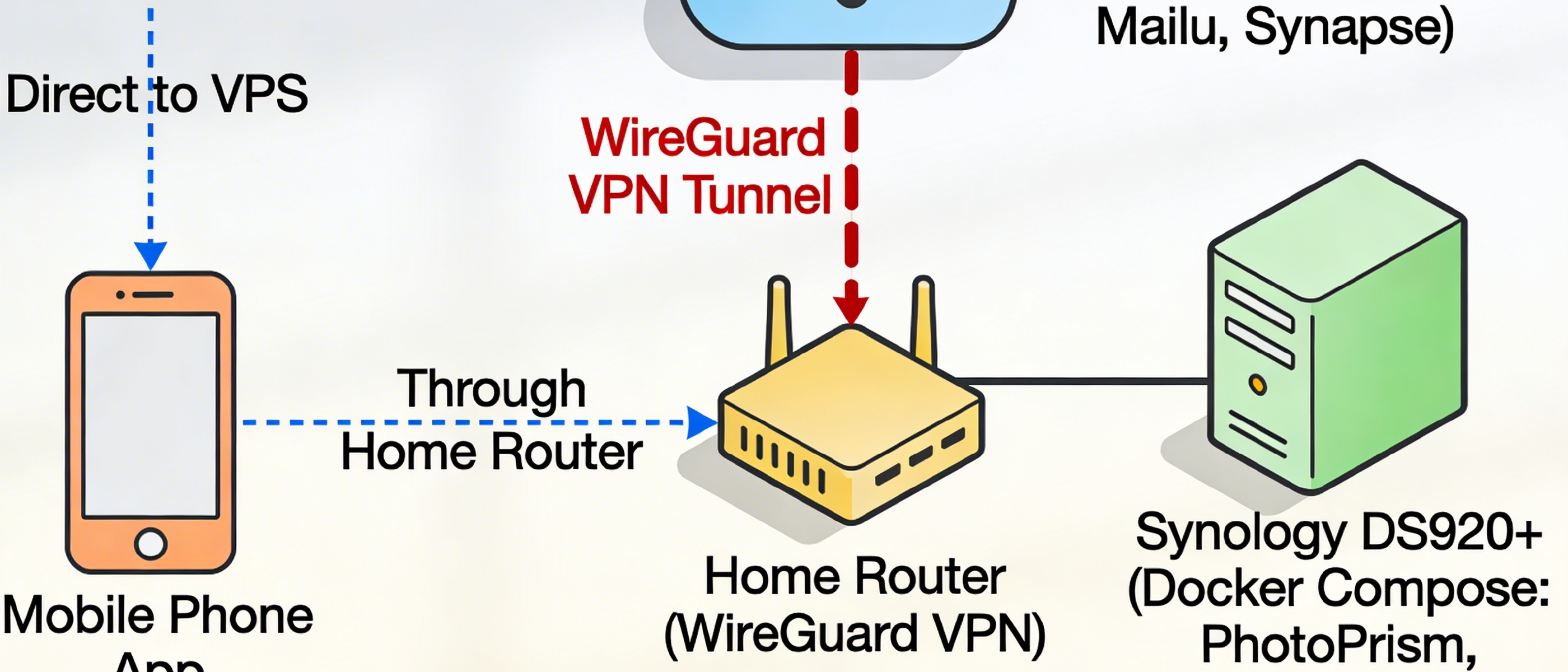
- 🟢 What survived: Nextcloud, PhotoPrism, Synology NAS, Matrix chat, and Mailu — all running, all used daily by the whole family.
- 🔴 What failed: Hosting everything at home (ISP uptime killed it); moved critical services to a VPS for reliability.
- 💡 The key insight: The real value of self-hosting compounds over time — owning your stack means you can integrate services in ways no commercial platform will ever let you.
I didn’t start self-hosting because I had kids.
I started because I like understanding systems — and because “data sovereignty” always felt like the grown-up version of caring.
But when we knew we were going to have a child, something changed.
It stopped being an interesting idea and became a decision: our family’s memories should live with us, not somewhere we can’t name or control.
That brings me to an ordinary morning at our place.
Breakfast is happening. I’m trying to find that one photo from last summer — the one that proves the day really happened the way I remember it.
And then my phone does the thing it always does at exactly the wrong moment:
“Your storage is almost full. Upgrade to get more.”
It’s such a small message. But it carries a big implication: the most private, irreplaceable parts of our family life live somewhere I have never been, in a data center I could not point to on a map, owned by a company that will happily keep our memories — as long as we keep paying.
That was my tipping point.
I’m not a privacy extremist. I don’t tape over webcams. I don’t refuse loyalty cards at the supermarket. But I do believe there’s a line between convenience and quiet dependence.
So about 10 years ago, I started moving our family’s digital life off big tech platforms and onto infrastructure we control.
This post is the honest version of that story: what actually survived daily family life, what failed in practice, and what I learned about building something that feels less like a hobby — and more like home.
If you want to self-host without turning your family into beta testers, this is the playbook I wish I had.
What I Was Trying to Replace
Let me be specific, because vagueness is where self-hosting projects go to die.
I wasn’t trying to build a tech hobby. I was trying to replace very concrete things my family uses every day — and I had a few “family-proof” requirements from the start:
- It has to work quietly in the background on phones.
- It has to feel boring and reliable, not exciting and fragile.
- It can’t depend on me being in the mood to babysit it.
With that in mind, here’s what I was trying to replace:
- Google Photos — storing and browsing tens of thousands of family photos
- Gmail — family email
- WhatsApp — the group chat that actually gets read
- Google Drive — syncing documents, calendars, contacts, and files across devices
The hard constraint was non-negotiable: no meaningful quality or convenience loss.
My partner is not going to tolerate an app that crashes constantly on their phone. If the self-hosted version causes daily friction, it will be abandoned, and I’ll lose family buy-in.
Privacy is the goal.
Usability is the gatekeeper.
The Survivors
These are the services that are still running today, still used in everyday life, and — most importantly — still trusted by the whole family.
That last part matters. In a household, “works” is not a benchmark. “Works consistently, without anyone having to think about it” is.
Nextcloud
Nextcloud became the quiet backbone of our setup.
Note: This is a rough, non-production example. Don’t expose this to the internet without understanding what it does. Use Docker Secrets, do NOT expose port 80!
services:
  db:
    image: mariadb:10.11
    command: --transaction-isolation=READ-COMMITTED --binlog-format=ROW --innodb-buffer-pool-size=2G
    restart: always
    volumes:
      - ./data/db:/var/lib/mysql
    environment:
      - MYSQL_ROOT_PASSWORD=${MYSQL_ROOT_PASSWORD}
    env_file:
      - db.env

  redis:
    image: redis:alpine
    restart: always

  app:
    image: nextcloud:fp
    restart: always
    volumes:
      - ./data/www.conf:/usr/local/etc/php-fpm.d/www.conf
      - ./data/nextcloud:/var/www/html
      - ./NC:/var/www/html/data
    environment:
      - MYSQL_HOST=db
      - REDIS_HOST=redis
      - PHP_MEMORY_LIMIT=1G
    env_file:
      - db.env
    depends_on:
      - db
      - redis

  nextcloud:
    image: nginx:alpine
    restart: always
    ports:
      - 80:80
    volumes:
      - ./data/nextcloud:/var/www/html:ro
      - ./NC:/var/www/html/data:ro
      - ./web/nginx.conf:/etc/nginx/nginx.conf:ro
    depends_on:
      - app

  cron:
    image: nextcloud:fpm
    restart: always
    volumes:
      - ./data/www.conf:/usr/local/etc/php-fpm.d/www.conf
      - ./data/nextcloud:/var/www/html
      - ./NC:/var/www/html/data
    entrypoint: /cron.sh
    depends_on:
      - db
      - redis
On paper, it replaces a whole bundle of services at once: file sync, shared folders, contacts, calendars, and lightweight document editing — basically a self-hosted Google Drive + Google Calendar + Google Contacts.
In practice, what made it survive is simple: it fits into the way people already use their phones.
Contacts and calendars sync via CalDAV and CardDAV, so my family keeps using the native calendar and contacts apps they already trust. In day-to-day life, that matters more than any feature list. It means the change is invisible.
The mobile apps are solid. Sync mostly happens in the background. The web UI has matured a lot too. It is not Google Docs, but it is more than enough for the kind of family collaboration that actually happens: a shared shopping list, trip planning notes, a folder of documents you need once a year and always at the wrong moment.
Trade-off: Nextcloud is not small. It has real surface area. Updates occasionally require attention, and the first months are where most of the learning and tuning happens. But once it settles, it earns its place by being boring in the best way.
PhotoPrism
PhotoPrism is the self-hosted Google Photos replacement, and it’s the one that impressed me most.
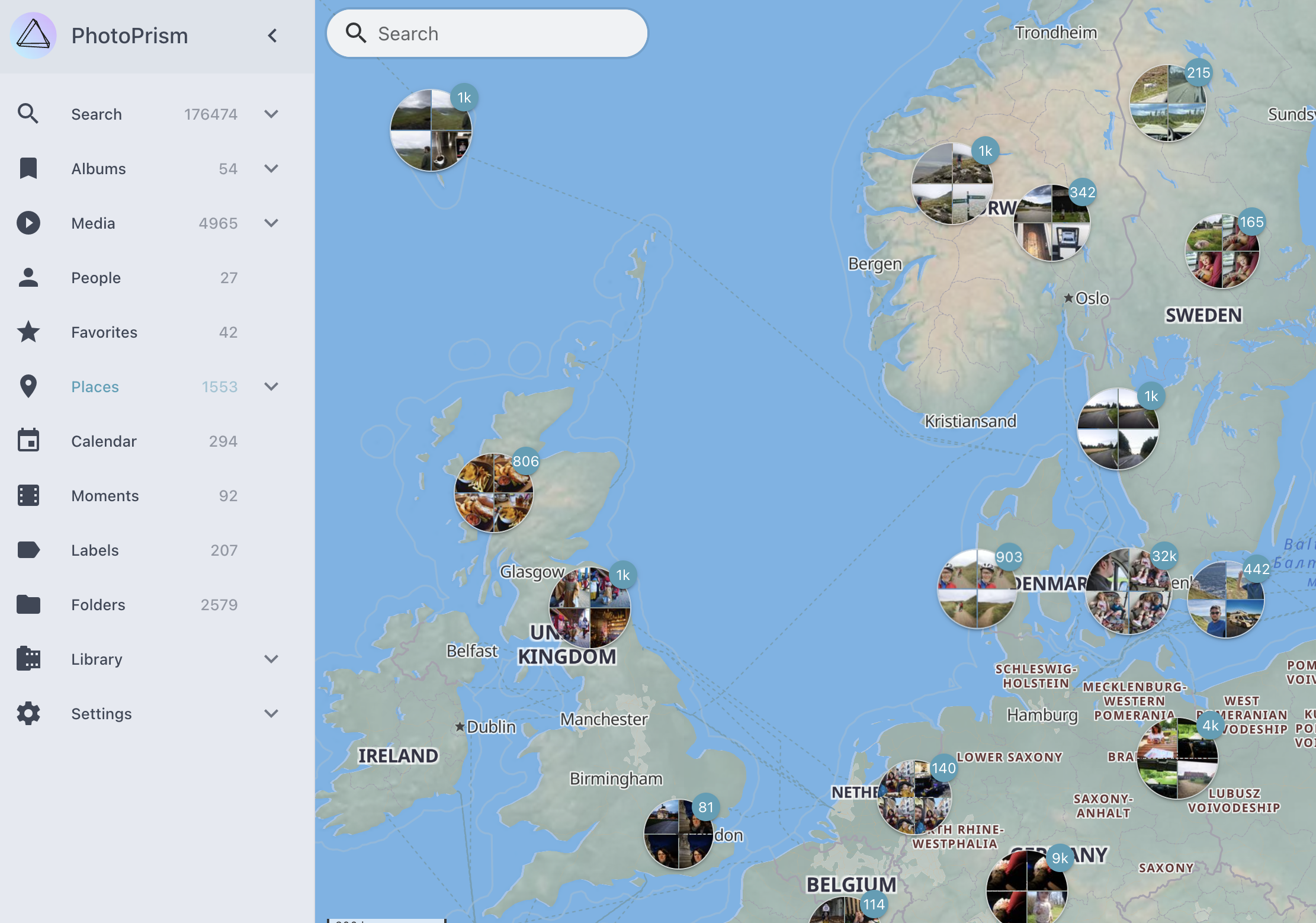
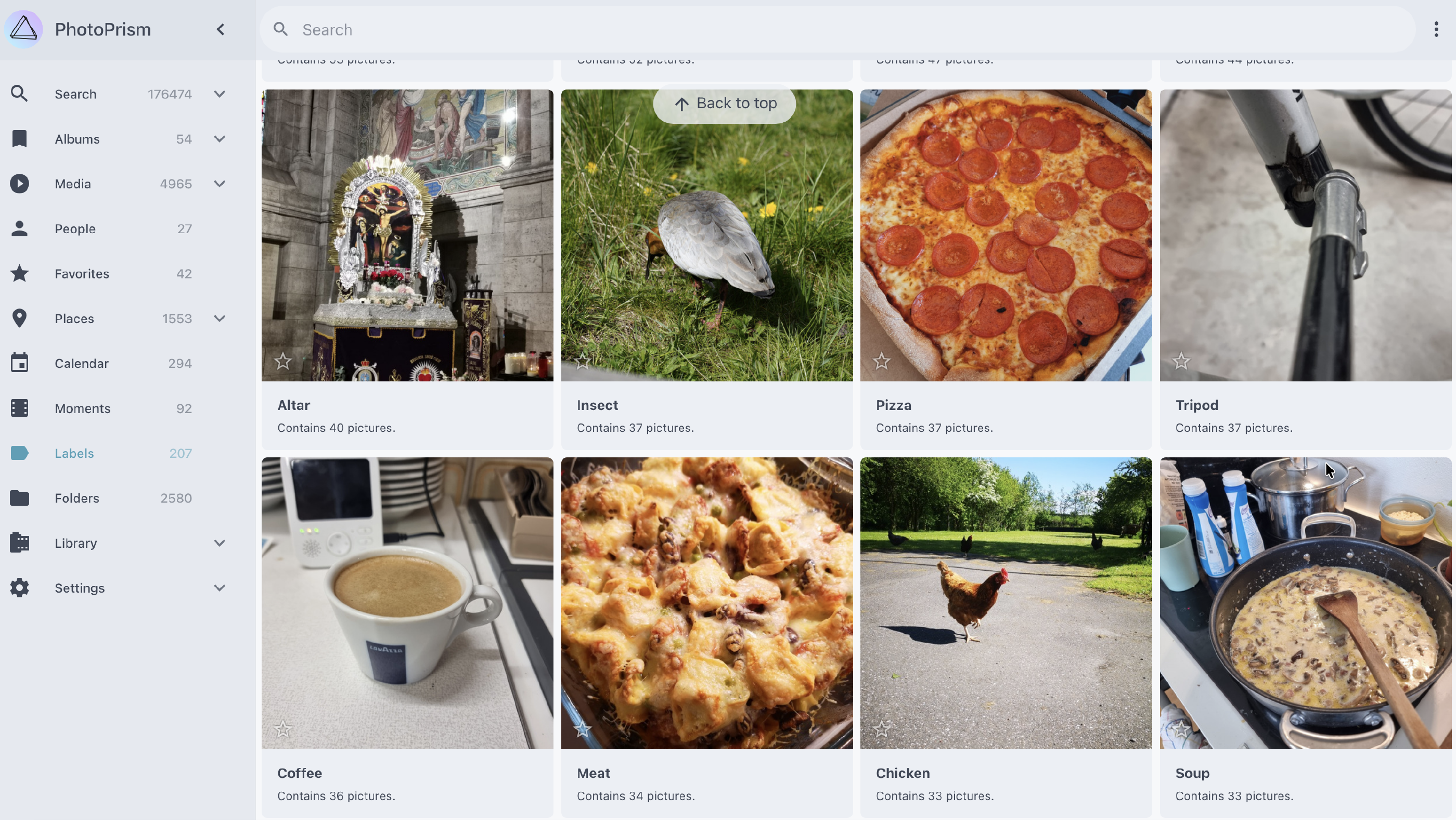
It indexes your entire photo library, recognizes faces, generates smart albums, and lets you browse by location on a map — all without sending a single pixel to an external server.
The AI-powered face recognition runs locally. The map feature uses OpenStreetMap. The mobile upload can be handled by the Nextcloud app, feeding into PhotoPrism’s watched folder.
Trade-off: Initial indexing of a large library of about 175000 photos takes a long time and is CPU/GPU-heavy. The mobile experience is good but not quite as seamless as Google Photos. Sharing a photo album with a grandparent who isn’t technical requires a bit of setup.
Synology NAS
The Synology NAS is the physical foundation — it’s where the data actually lives. We use a Synology DS920+ with 4x4TB HDDs.
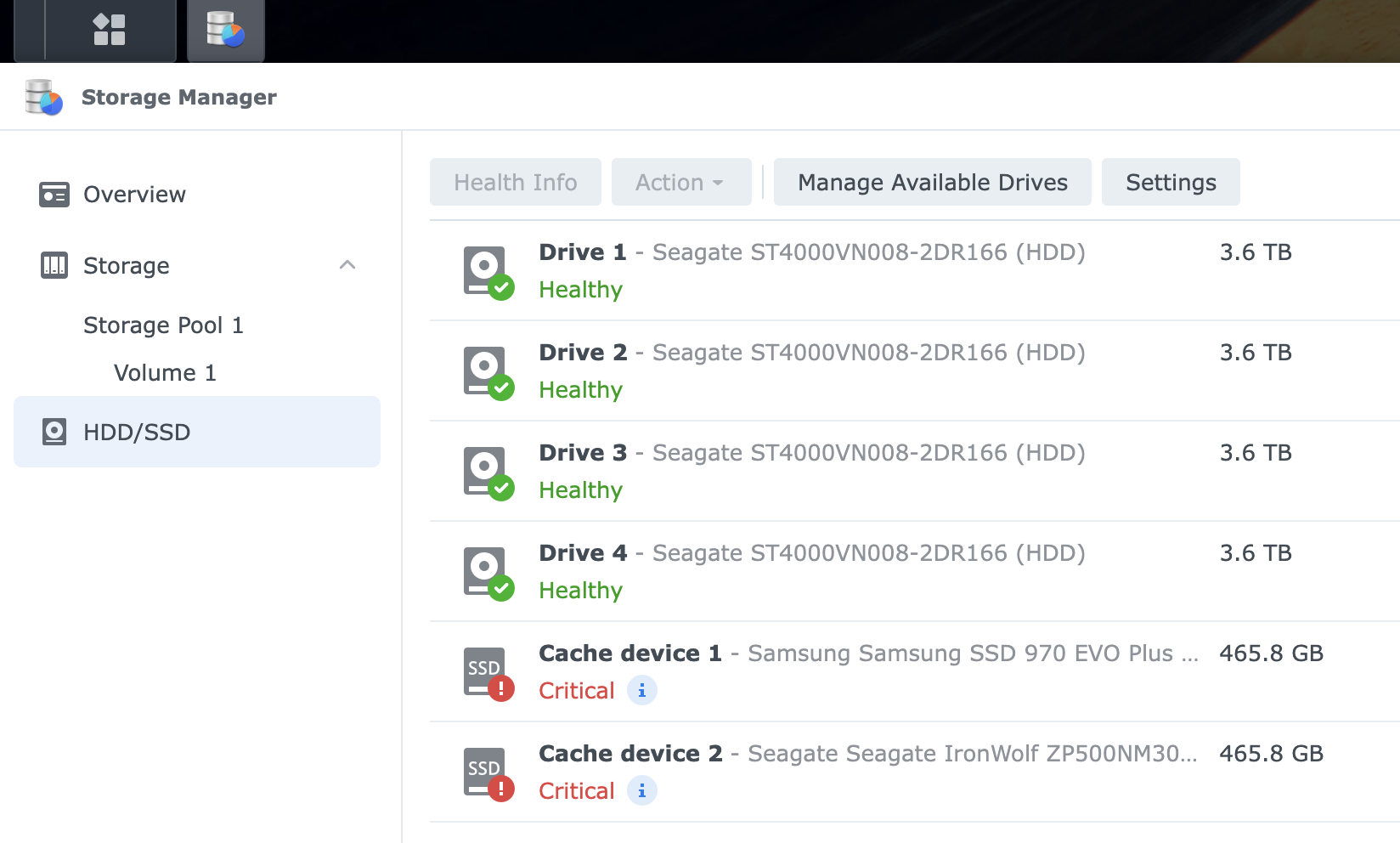
Synology’s DSM (DiskStation Manager) operating system is polished, regularly updated, and has its own app ecosystem.
What makes it family-proof is reliability. RAID protects against disk failure. The hardware runs 24/7 without intervention. Synology’s own backup tools can handle data durability.
Trade-off: Upfront hardware cost is real. And — important lesson coming — a NAS at home is not the same as a cloud server.
Matrix (Family Chat)
Replacing WhatsApp was the hardest sell in the family. Messaging is deeply habitual. Everyone is already in WhatsApp, including the extended family and the kids’ school groups.
The solution: a private Matrix server for the inner family only, running Synapse with the Element client on everyone’s phones.
The key to getting buy-in was making it a dedicated space — the family chat, the one where only us five exist, where photos are shared, where good morning messages land. Not a replacement for all messaging, just our private channel.
It has survived because it fills a specific, contained role. The kids actually prefer it for family stuff because it feels separate from the noise of WhatsApp.
Trade-off: The Matrix/Element ecosystem can feel rough around the edges compared to iMessage or WhatsApp. Notifications can occasionally misbehave. Federation features are powerful but irrelevant for a closed family server.
Mailu (Mail Server)
Email is the hardest service to self-host correctly.
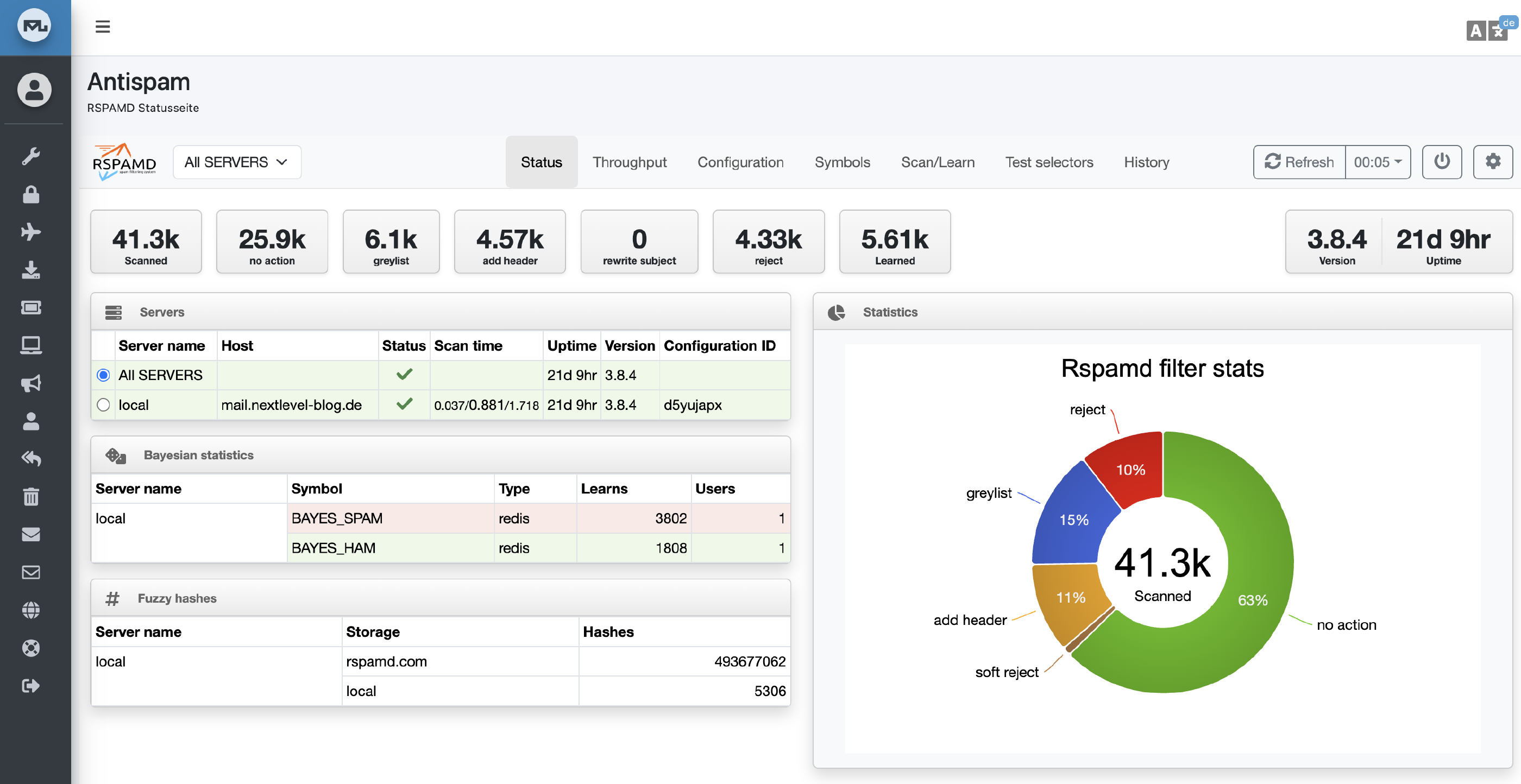
Deliverability — making sure your emails actually land in inboxes and don’t get flagged as spam — requires careful DNS configuration: SPF, DKIM, DMARC records all need to be right. Mailu made this manageable.
Mailu is a full email stack in Docker Compose: SMTP, IMAP, webmail, antispam, all pre-configured to work together.
The family now has email addresses at our own domains.
Trade-off: Email self-hosting is the highest-maintenance item on this list. You are responsible for spam filtering, deliverability reputation, and uptime. If your server’s IP ends up on a blacklist, emails stop arriving. Expect to spend time on this, especially at first.
The Failures
Honesty matters here, because self-hosting blog posts that only show the wins are misleading.
Running Everything from Home Doesn’t Work
My original plan was always to host everything on my own hardware from my own home. It failed multiple times for one simple reason: a normal home setup cannot promise data-center reliability.
ISPs have outages. Power blips happen. Routers reboot. And in a family context, “it’ll probably be fine” isn’t a plan — it’s an eventual incident.
There were nights when the router rebooted, the dynamic IP changed, or the connection dropped for an hour. For personal experiments, that’s fine. For the family email server, it’s not.
The solution was pragmatic: I moved the critical services — especially the mail server and the Matrix chat — to a cloud VPS, Hetzner CAX21.
Less romantic than pure self-hosting, but far more reliable. The NAS at home remains the primary storage, with important data synced or backed up to the VPS or an encrypted cloud storage box, Hetzner BX21.
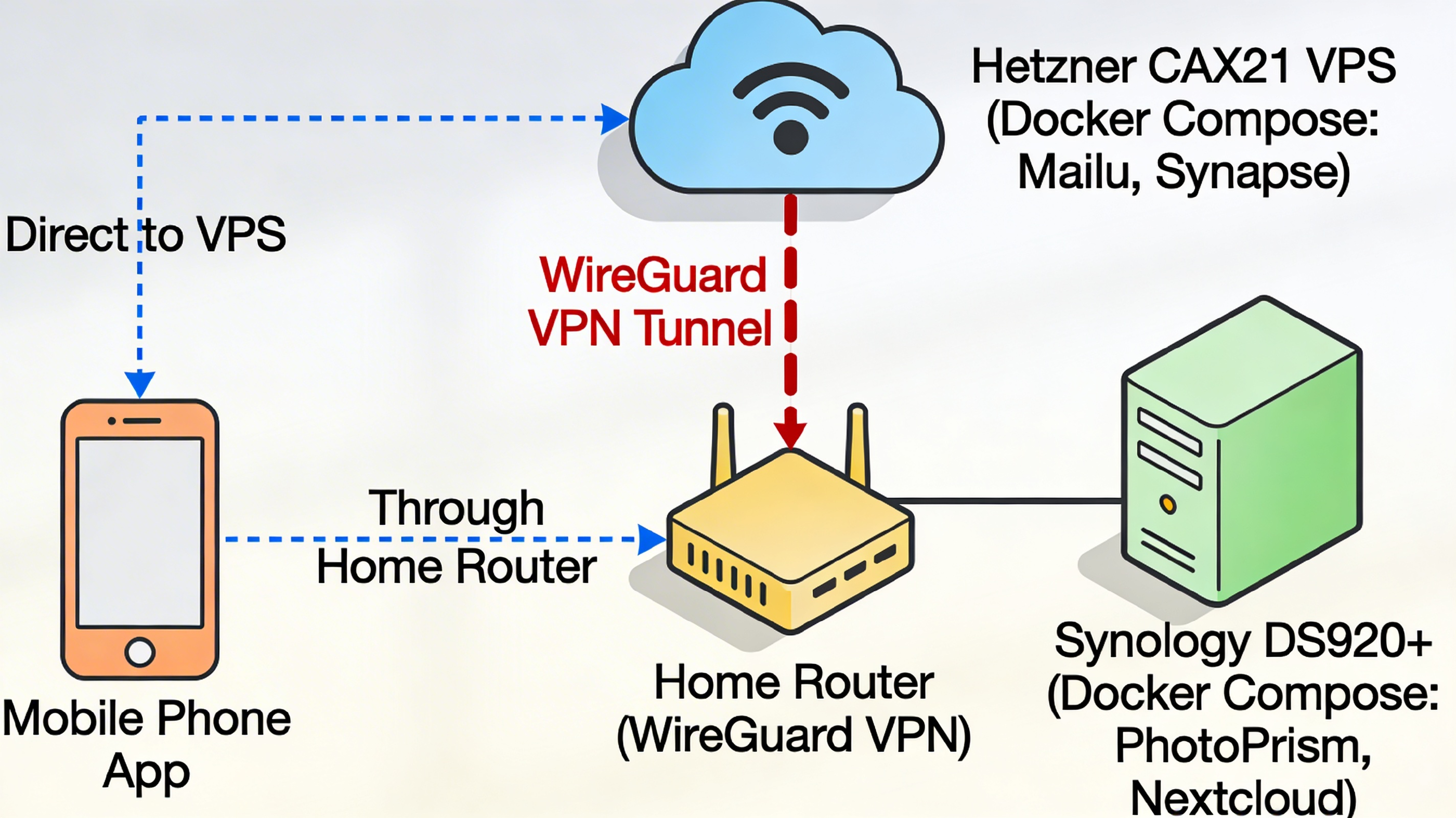
This is not a failure of principle — it’s a maturation of the approach. Renting a small server is still infinitely more private than using Gmail. You control the machine, the OS, and the data.
Docker Replaced Everything Else
I initially experimented with running services natively, inside VMs, and with various package managers. Docker won.
Not because it’s perfect, but because it is the most practical deployment method for a homelab: services are isolated, upgrades are repeatable, configuration lives in a compose file you can put under version control, and the community documentation almost always gives you a working Docker Compose example.
This isn’t a failure so much as an evolution — but if you’re starting today, skip the manual installs and go Docker-first.
What I Learned
- Start small. Pick one service, get it stable, live with it for a month before adding the next. Trying to migrate everything at once is how projects collapse.
- There is a learning curve, and it is real. The first months require significant time investment. It flattens out, but don’t underestimate it. Of course, this also depends on your initial knowledge. But rest assured, what you learn hereby, is valuable no matter what.
- If you don’t pay with your data, you pay with your time. This is the core trade-off of self-hosting. You are the sysadmin now. That means updates, monitoring, backups, and occasional late-night debugging. There is a reason professional but private services are expensive. It is simply a wrong assumption that IT services are cheaper than any other real-world physical services.
- Consumer services are extremely polished. Google Photos’ search, Apple’s iMessage delivery reliability, Gmail’s spam filtering — these are the results of billions of dollars and thousands of engineers. Some self-hosted alternatives are genuinely excellent and impressive. Others have rough edges. Know what you’re accepting.
- Backups are not optional. Remember the 3-2-1 rule. If you haven’t tested restoring from backup, you don’t have a backup. You took your data under your control. This also means you carry the full responsibility. There is noone else left to blame — than you.
- Family buy-in requires quality. The best privacy-preserving service is the one your family actually uses.
The Integration Superpower
This is the part people don’t always talk about when they compare self-hosted tools to their big tech equivalents. We tend to measure features.
But the deeper difference is ownership of the connections.
When you run your own services, you also own the glue between them. There are no API rate limits to negotiate. No product team deciding what you are allowed to automate. No vendor policies that quietly change what “works” from one month to the next.
And that’s where self-hosting stopped feeling like a defensive move — and started feeling like a gift.
Every morning, a small python script triggered by a cron job looks through our PhotoPrism library for photos taken on the same calendar day, one to three years ago. It picks one, and it posts it into our family Matrix chat.
Some mornings it’s a birthday. Some mornings it’s a holiday. Sometimes it’s just a random Tuesday where someone made a ridiculous face at the camera.
And then something small but important happens: someone reacts. A quick 😄. A “Wait, was that really three years ago?” A “Look how tiny you were.”
No app sells this exact feeling. No subscription tier unlocks it. It took an afternoon to build, and it has become one of the most quietly loved things in our digital family life.
That is the compounding return of self-hosting. Once you have the building blocks, you can shape them around your actual life — not the other way around.
And with AI coding assistants today, the distance between “I wish I had a feature that…” and “I built it this weekend” has never been shorter.
Who Should Do This (And Who Shouldn’t)
This is for you if:
- You want to own your family’s data, long-term
- You enjoy learning — not just deploying, but understanding what’s running
- You’re willing to accept that you are now the IT department
- You dislike the idea of your memories being the product
- Privacy isn’t a paranoia, it’s a principle
This is probably not for you if:
- You want zero maintenance after setup — that service doesn’t exist
- Your household has zero tolerance for any occasional hiccup
- You don’t have at least a few hours a month for upkeep
- You need every feature of Google Photos or Gmail from day one
Self-hosting is not a one-time project. It’s a practice. If that sounds like work, it is — but it’s also the kind of work that gives you something back.
If You Want to Start: A Practical Checklist
- Get a small NAS or repurpose an old PC as your local storage foundation — Synology is beginner-friendly; a repurposed mini PC with TrueNAS or any Linux distro (assuming you are already familiar) works too.
- Rent a cheap VPS (Hetzner, IONOS, OVH, or similar) for services that need reliable uptime — a €5–10/month server is definitely enough to start.
- Learn Docker Compose basics before installing anything — one afternoon of tutorials saves weeks of frustration.
- Start with Nextcloud — it replaces the most services (files, contacts, calendar) with a single install and has the most mature client apps.
- Register your own domain for email and services — this is essential for email deliverability and makes everything feel professional.
- Get PhotoPrism running against a test folder before migrating your full library — understand how indexing works before committing.
- Do not start with email. Seriously. Get everything else stable first. Email is the hardest to get right and the most painful if it breaks. I myself only added it after years on this journey.
- Set up backups before anything else goes live — test a restore, not just a backup.
- Introduce one family member at a time — start with a partner or a technically curious person; don’t force a migration on everyone at once.
- Document your setup — a simple text file or a private wiki page e.g., Notion Page or Obsidian describing what runs where will save you when you forget six months later.
Ten Years In, Still Running
The photo of the day appeared in our family chat this morning. It was from three years ago: my older daughter, asleep in the back of our camper van somewhere in Norway, golden afternoon light, one sock on.
That image lives on our NAS. It was indexed by PhotoPrism. It was fetched by a script. It was sent over to our Matrix server. Not one byte of it passed through a Silicon Valley data center.
That’s what it’s about — not the technology, not the ideology. Just keeping what’s yours, yours.
I am Peter, a usual family dad, cybersecurity expert, living in Copenhagen, Denmark and traveling around in our camper van. If you want to follow along subscribe here: https://youtube.com/@SensingTheWorld